Embedding External Applications into a Next.js Site
June 1, 2025
Updated October 2026 so the code samples match how the site works today.
One of the coolest features of this site is the ability to embed my standalone projects right within the site experience. These aren't just static code samples, they're fully functional web applications with their own domains. It was more complicated than I expected to get working, and I will detail how I did so here.
The Challenge
I've built several standalone applications like my hurricane tracker that visualizes NOAA data, my attendance management system, and a directory for UH Computer Science Discord servers. Each has its own repository and deployment.
I wanted users to be able to interact with these applications directly on my portfolio site without being sent away to different domains. This maintains a consistent experience and keeps visitors engaged with my portfolio.
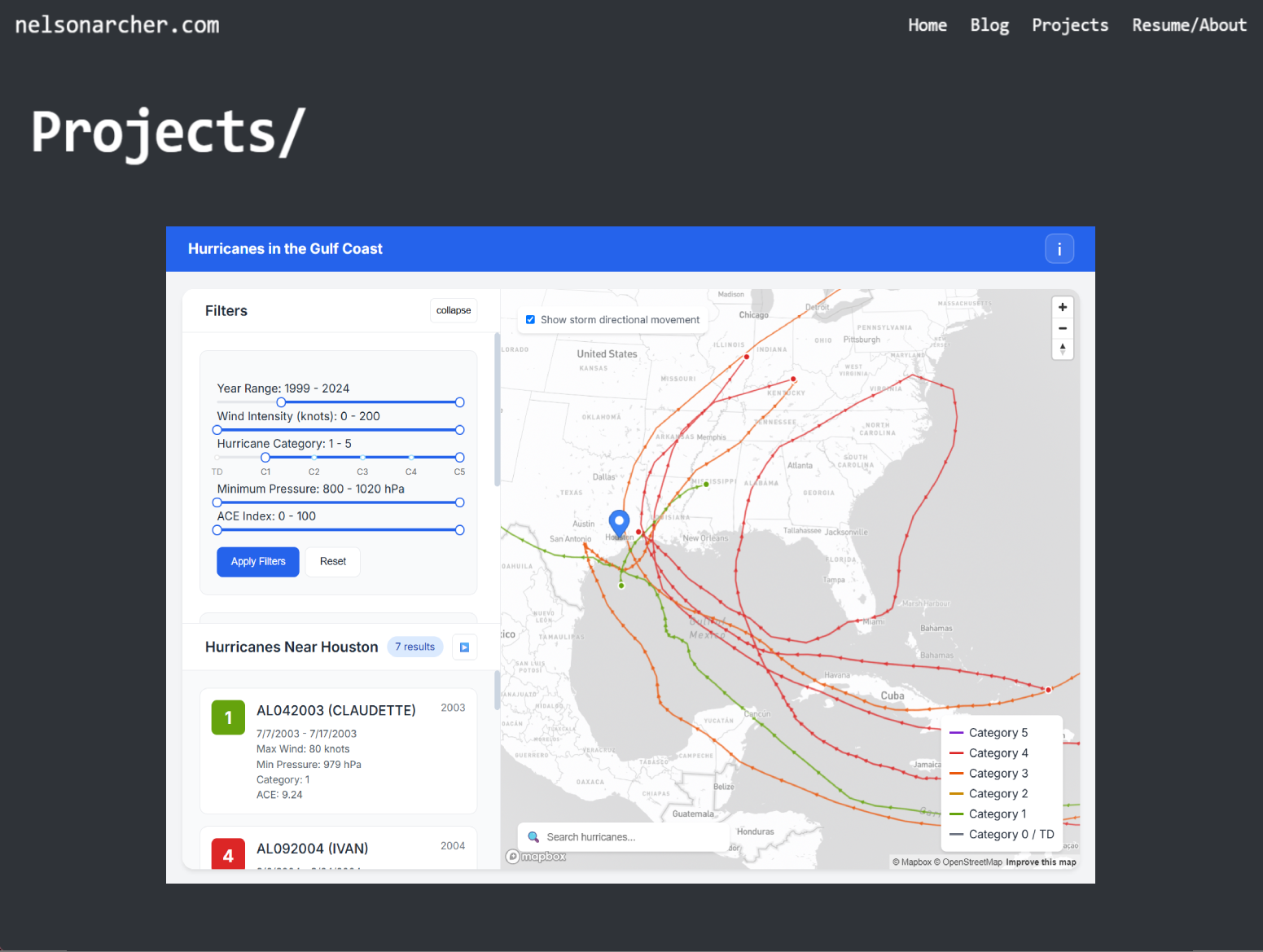
The Solution: iframes with Next.js Dynamic Routing
The core of my implementation uses iframes to embed external applications, combined with Next.js's dynamic routing capabilities. Here's the basic approach:
1. The Demo Page Component
First, I created a dynamic route at app/demos/[slug]/page.tsx that loads the appropriate application based on the URL. generateStaticParams prerenders a page for every demo at build time, and for a demo that can be embedded, the page is a full-screen iframe:
// app/demos/[slug]/page.tsx (trimmed)
export async function generateStaticParams() {
  return demos.map((demo) => ({ slug: demo.slug }));
}

export default async function DemoPage({ params }: { params: Promise<{ slug: string }> }) {
  const { slug } = await params;
  const demo = demos.find(d => d.slug === slug);

  if (!demo) {
    notFound();
  }

  if ('url' in demo && demo.url) {
    return (
      <Layout fullPage>
        <div className="w-full h-screen">
          {/* JSON-LD WebApplication data and a <noscript> fallback link */}
          <iframe
            src={demo.url}
            className="w-full h-full border-0"
            allow="accelerometer; autoplay; clipboard-write; encrypted-media; gyroscope; picture-in-picture"
            allowFullScreen
          />
        </div>
      </Layout>
    );
  }

  // External demos get a landing page instead (section 4)
}
Passing fullPage to my Layout component skips the site header and footer, so the embedded app gets the whole window. Next to the iframe, the page renders a JSON-LD WebApplication block and a <noscript> block with the demo's title, description, and a link to the app, both for SEO.
The page's metadata lives in generateMetadata in app/demos/[slug]/layout.tsx: the title, a canonical /demos/... URL, an Open Graph image (falling back to a generic one if the demo doesn't have its own), and the demo's own favicon if there's one at public/demos/<slug>/favicon.ico.
2. The Demo Data Structure
I maintain a central registry of all my demo projects in a TypeScript file. Each entry is one of two shapes: an embeddable demo with a url, or an external one with an externalUrl.
// lib/demoData.ts (excerpt)
interface BaseDemo {
  slug: string;
  title: string;
  description: string;
  thumbnailBase: string;
  thumbnailExt?: 'png' | 'gif' | 'jpg'; // Default: 'png'
  hidden: boolean;
  techStack: string[];
  category?: 'contract' | 'personal';
  projectSlug?: string; // link to docs page when present
}

interface ExternalDemo extends BaseDemo {
  externalUrl: string;
}

interface InternalDemo extends BaseDemo {
  ogImage: string;
  fullPage: boolean;
  url: string;
  keywords: string[];
}

type Demo = ExternalDemo | InternalDemo;

export const demos: Demo[] = [
  {
    slug: "hurricane",
    title: "Hurricane Data Visualizer",
    description: "Track hurricanes and weather patterns, and quickly visualize data from NOAA.",
    thumbnailBase: "/demos/hurricane/thumbnail",
    thumbnailExt: "gif",
    ogImage: "/demos/hurricane/og",
    fullPage: true,
    hidden: false,
    url: "https://hurricane-adam.vercel.app", // The actual URL of the standalone app
    category: 'personal',
    techStack: ['React', 'TypeScript', 'Next.js', 'Mapbox'],
    keywords: ["hurricane tracker", "NOAA data visualization", /* ... */],
  },
  // Other demo projects...
];
The page tells the two shapes apart with 'url' in demo, which also narrows the TypeScript type. hidden: true keeps a demo off the projects page and out of the sitemap. projectSlug makes the demo's card on the projects page link to a write-up instead of the app.
This structure allows me to maintain clean separation of concerns—each project exists in its own repository with its own deployment, but they're presented in a unified way on my portfolio.
3. Clean URLs with Redirects
To make the URLs cleaner and more memorable, I added redirects in my Next.js configuration:
// next.config.js (excerpt)
const nextConfig = {
  // Other configuration...
  async redirects() {
    return [
      {
        source: '/hurricane',
        destination: '/demos/hurricane',
        permanent: true,
      },
      {
        source: '/uhcs-disc',
        destination: '/demos/uhcs-disc',
        permanent: true,
      },
      {
        source: '/attendance',
        destination: '/demos/attendance',
        permanent: true,
      },
      // Other redirects, for old content URLs...
    ];
  },
}
This allows visitors to access my hurricane tracker at nelsonarcher.com/hurricane instead of the longer path. The sitemap lists only the /demos/... URLs, not these short aliases.
4. Handling External Sites That Can't Be Embedded
For projects that can't be embedded directly (like my Ping Pong Pi scoreboard), or where an iframe doesn't make sense (like a userscript whose home is a GitHub repo), I use a different approach. These are ExternalDemo entries, and their /demos/[slug] page is a landing page with a link out instead of an iframe:
// app/demos/[slug]/page.tsx (simplified)
if ('externalUrl' in demo) {
  return (
    <Layout>
      <div className="min-h-screen flex flex-col p-4 max-w-4xl mx-auto">
        <Breadcrumbs />
        {/* JSON-LD WebApplication data, same as the iframe page */}

        <h1>{demo.title}</h1>
        <p>{demo.description}</p>

        <h2>Technologies Used</h2>
        {demo.techStack.map(tech => (
          <span key={tech}>{tech}</span>
        ))}

        {/* A short "About This Project" paragraph, worded by demo.category */}

        <a href={demo.externalUrl} target="_blank" rel="noopener noreferrer">
          Launch {demo.title}
        </a>
        <a href="/projects">← Back to Projects</a>
      </div>
    </Layout>
  );
}
This page uses the normal Layout, so it keeps the site header and footer. Nothing happens until the visitor clicks "Launch", which opens the app in a new tab. An earlier version of this page redirected automatically after three seconds; I removed that, so the page now stays put and has its own content for search engines to index.
On the projects page, the cards for these demos link straight to the external site, so this landing page is mostly what search results and direct links to /demos/... reach.
Performance Improvements
To make embedded sites load quickly and fill the screen, I did two things:
1. Preconnect Hints
In the root layout (app/layout.tsx), I added preconnect hints to establish early connections to external domains:
// app/layout.tsx (excerpt)
<head>
  {/* Add preconnect links to external domains for performance */}
  <link rel="preconnect" href="https://hurricane-adam.vercel.app" />
  <link rel="preconnect" href="https://pingpongpi.com" />
  <link rel="preconnect" href="https://attendance-tracker-eta.vercel.app" />
  <link rel="preconnect" href="https://test-cosc-list2.vercel.app" />
  {/* ... */}
</head>
Because these are in the root layout, every page on the site sends them, not just the demo pages.
2. Responsive iframe Container
This isn't the usual 16:9 aspect-ratio wrapper. Each embedded app is a full website with its own responsive layout, so the iframe fills the browser window and the app adapts to whatever size that is. Three things make that work:
<Layout fullPage>returns the page's children with no header, footer, or padding around them.- The wrapper
divisw-full h-screen(full width, 100vh tall), and the iframe inside it isw-full h-full border-0. - Tailwind's base styles (Preflight) remove the browser's default
bodymargin and make iframesdisplay: block, so there's no gap or extra scrollbar around the frame.
// components/layout.tsx: fullPage skips the header and footer
if (fullPage) {
  return <>{children}</>;
}

// app/demos/[slug]/page.tsx: the wrapper is one viewport tall and the iframe fills it
<div className="w-full h-screen">
  <iframe src={demo.url} className="w-full h-full border-0" /* allow, allowFullScreen */ />
</div>
Security Considerations
When embedding external content, security is important. I only embed applications I control, which matters because the iframes don't use the sandbox attribute. The site also sends a few standard security headers on every response:
// next.config.js (excerpt)
const nextConfig = {
  poweredByHeader: false, // Remove X-Powered-By header for security
  async headers() {
    return [
      {
        source: '/(.*)',
        headers: [
          { key: 'X-Content-Type-Options', value: 'nosniff' },
          { key: 'X-Frame-Options', value: 'SAMEORIGIN' },
          { key: 'X-XSS-Protection', value: '1; mode=block' },
          { key: 'Referrer-Policy', value: 'strict-origin-when-cross-origin' },
        ],
      },
      // Plus long-lived Cache-Control headers for static assets...
    ];
  },
}
X-Frame-Options: SAMEORIGIN controls who can put this site in a frame (only my own pages can), not which sites my pages can embed. There's no Content Security Policy, so nothing on my side restricts what the iframes load. Whether a site can be embedded is decided by that site's own response headers (X-Frame-Options or a CSP frame-ancestors directive), not by mine.
The End Result
The final implementation creates a seamless experience where visitors can explore my projects without leaving my portfolio. Each project maintains its own independent deployment, but they are presented in a unified way within my site.
This technique is not limited to portfolio sites—it can be applied whenever you want to integrate separate applications into a unified experience. Whether you are building a learning platform with interactive examples or a product showcase with live demos, this approach provides a clean solution for seamless integration.